Last updated on May 1, 2026
- The ‘More Columns Options’ button lets you customize the columns shown.
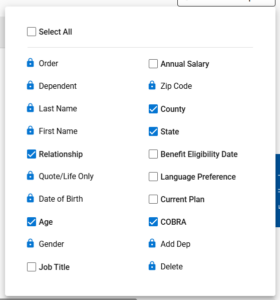
- Clicking the button shows a list of columns with defaults selected; a lock icon means the column can’t be removed from the grid.
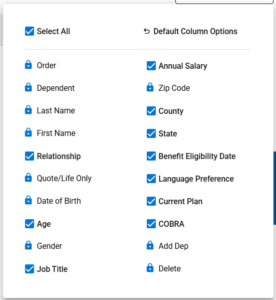
- Check ‘Select All’ to show every column in the grid.
- To remove columns from the grid, simply deselect one or more of the column checkboxes.
- To display columns in the grid, select the checkboxes for any columns you want to show.
- A notification shows the columns were updated.
- Select Default Column Options to display the standard columns within the grid.
- A notification shows the default columns are restored.
-