Last updated on June 26, 2026
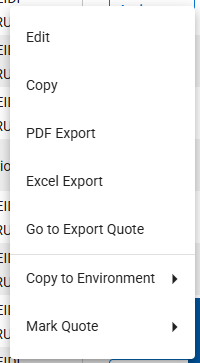
- Your role and the quote’s status determine which actions you can take.
- Edit
- Provides access to the quote in the same manner as selecting the Quote Name hyperlink.
- Copy
- Copies the quote.
- The Quote Details page for the copy of the quote is displayed.
- PDF Export
- View the most recently generated PDF file
- The PDF file can be accessed even when the Excel file is still processing
- Excel Export
- View the most recently generated Excel file
- Go to Export Quote
- This takes you to the Export Quote page, where you can regenerate your quote output if it is completed.
- Copy to Environment (Limited Assignment)
- Available only if permissioned
- Allows you to copy a quote from a higher environment to a lower one (Production, Stage, Test, Development).
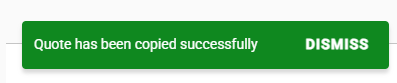
- A notification shows that the quote has been successfully copied to the chosen environment.
-
- Mark Quote (Admin and Staff Roles Only)
- Mark as Not Processed
- This can be used if the quote is stuck in processing.
- Mark Final
- The current quote status must be completed.
- The quote has been finalized with the group.
- Mark Unfinal
- The current quote status must be final.
- The quote is no longer finalized with the group.
- Mark Pending Sale
- The current quote status must be completed.
- The quote is about to be finalized with the group
- Mark as Not Processed