Last updated on June 26, 2026
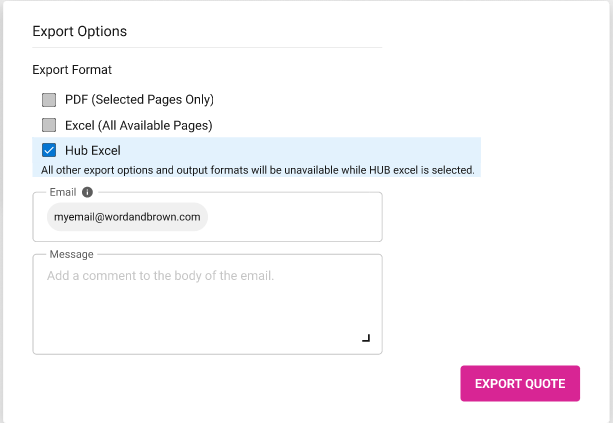
- Export Format
- The PDF format is set as the default option.
- The Excel format can be chosen.
- The original WBQuote Excel file will be created and provided.
- The original WBQuote Excel file cannot be provided if the quote contains a triple wrap package and/or different contributions for carriers included in a wrap package.
- The new WBQuote Excel file is currently unavailable. – Coming Soon
- Both PDF and Excel formats can be selected.
- The HUB Excel is exclusively available to users linked to the “HUB International – Monterey” (#51879) agency.
- When selected, the PDF and Excel formats are not accessible.
- Delivery Method
- Download – Coming Soon
- Email
- The output file will be delivered via email.
- Email Addresses
- Defaults to the logged in user’s email address.
- The default email can be removed.
- At least one email must be entered.
- Message
- You can enter a message to include in the email. This is optional.
- Note: The output file can be accessed through the Actions in the Dashboard before the email is received.
- Export Quote Button
-
- Click to generate the output file and email notification.
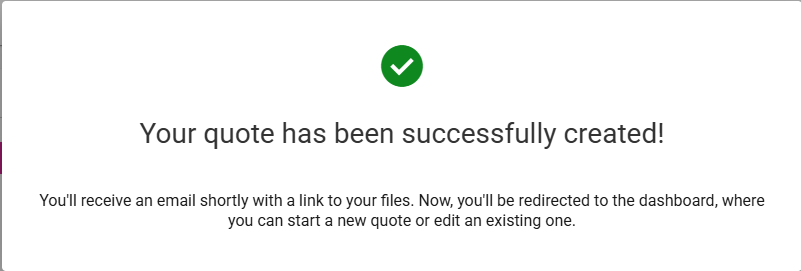
- The following message is displayed.
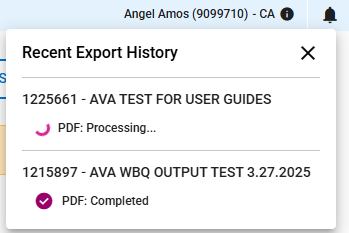
- The status of the quote output file is displayed in the top right corner of the Dashboard.
-