Last updated on June 26, 2026
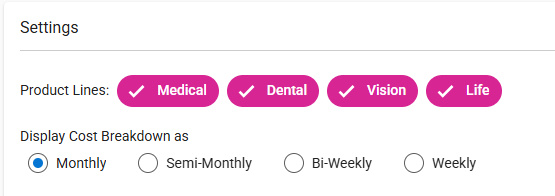
- Product Lines
- By default, any product line included in the quote is selected.
- You have the option to deselect any product line that should be excluded from the output.
- Display Cost Breakdown as (Pay Period)
- Default Selection: Monthly
- You may choose one of the other available options:
- Semi-Monthly
- Bi-Weekly
- Weekly
- The “Display Cost Breakdown as” setting is used to calculate rates on the following output pages:
- Employee Monthly Net Cost Illustration
- Employee Choice Enrollment Worksheet
- Member Level Enrollment Worksheet
- Dental Ancillary Enrollment Worksheet
- Vision Ancillary Enrollment Worksheet
- Life Ancillary Enrollment Worksheet
- Other Settings – Coming Soon
- Include/Exclude Dependents and Spouse
- Custom Colors
- View Agency Logo