Last updated on May 12, 2026
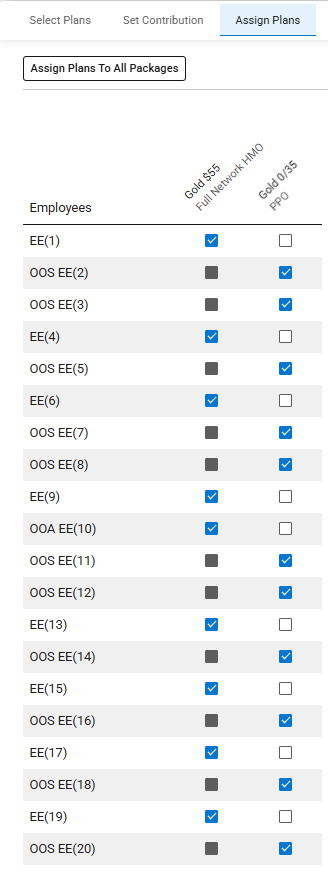
- Each employee is automatically assigned to the first eligible plan.
- When a plan is not eligible for an employee, the checkbox is unavailable for selection.
- When a plan is removed from a package, the next eligible plan is assigned.
- You can manually change the plan assigned by selecting a different plan checkbox for the employee.
- Only one plan can be assigned to an employee at a time.
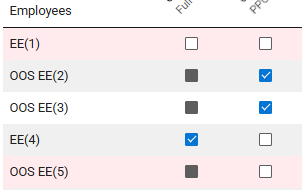
- The employee row is highlighted if a plan is not assigned. The package displays the number of unassigned employees.
- If the assignment is changed, the Discard and Save buttons are available.
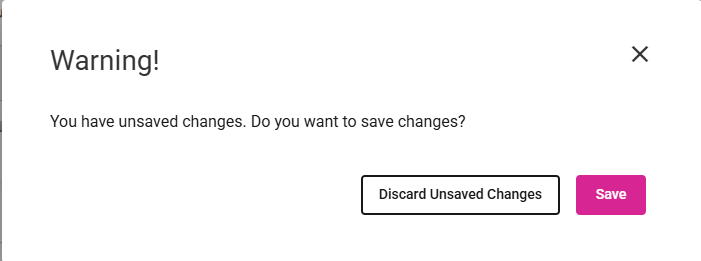
- If the change is not saved or discarded, a warning message is displayed.
- If the assignment is changed and then changed back, the Discard and Save are not available.
- When one or more assignment is changed the following is updated within the package(s):
- Number of assigned employees
- Number of unassigned employees
- Number of assigned employees for each plan
- Plan premium for each plan
- ER Cost, EE Cost and Total Premium